RoamAid Text Messaging

Last updated: October 13, 2026

Who sends these messages

ROAMAID INC (RoamAid), Indio, California. Messages are sent from the RoamAid number provided with your booking. Messages are sent from RoamAid's number, +1 408-762-6243.

Who receives messages

Travelers. Customers who verify their U.S. mobile number during signup and optionally choose SMS and/or WhatsApp safety check-ins. Verification codes are sent to all customers as part of signup. Trip confirmations and scheduled safety check-ins are sent only to customers who selected those channels.

Emergency contacts. A person listed as an emergency contact receives a one-time invitation asking for their consent. No further messages are sent unless they reply YES. They may withdraw consent at any time by replying STOP.

How to opt in — enrollment flow

Online enrollment is open. Online payment will be available soon.

  1. Page 1 — Identity and agreement. Enter your name, email address, and travel dates. Review and accept the Terms & Conditions and Privacy Policy.
  2. Page 2 — Mobile number and services. Enter your U.S. mobile number and tap "Verify number." A one-time verification code is sent to that number. You also choose your optional services: voice assistance is always included; SMS safety check-ins and WhatsApp safety check-ins are separate, optional choices, each requiring its own consent. Both are unticked by default. You also provide an optional emergency contact.
  3. Page 3 — Payment. Review your trip summary and complete payment. Trip Protection activates after payment is verified.

Example: SMS consent as shown on signup page 2

+1

This checkbox is optional and not required to purchase.

Terms & Conditions · Privacy Policy

This is an example for reference only. To sign up, visit roamaid.me/signup.

Enrollment flow screenshots
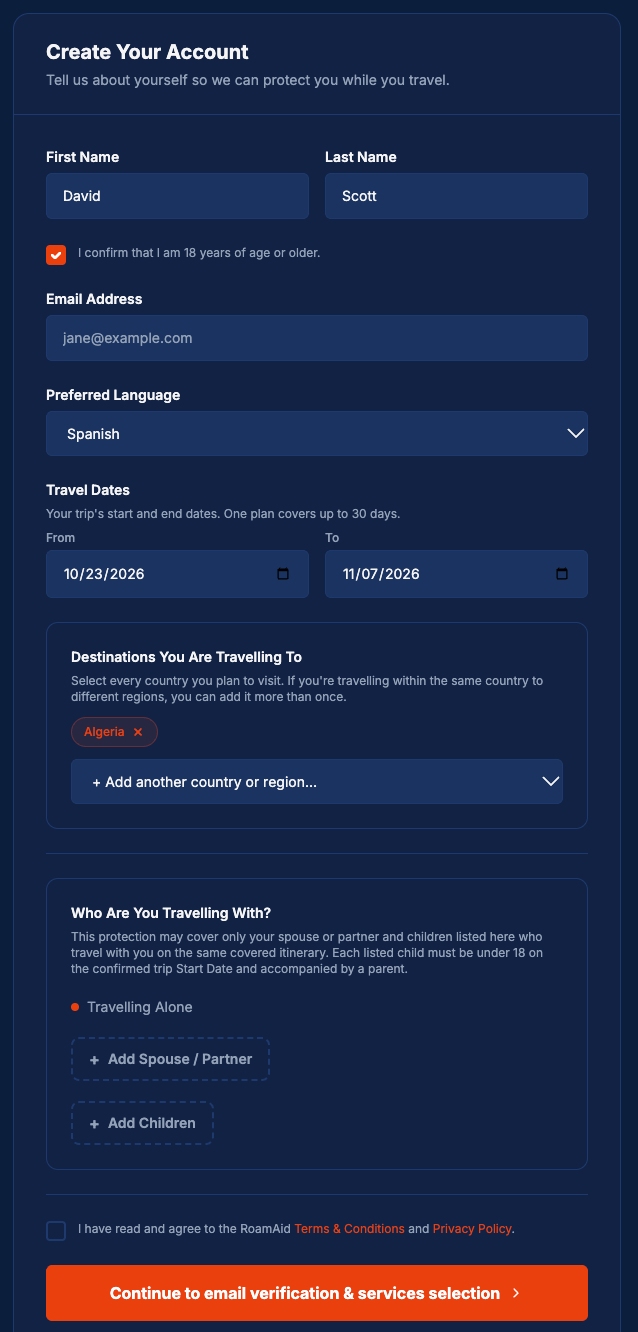
Screenshot of the RoamAid signup page 1 showing the Create Your Account form with fields for name, age confirmation, email, preferred language, travel dates, destinations, and companions, plus the Terms and Privacy Policy agreement checkbox.
Step 1: Create account. The traveler enters their name, confirms they are 18 or older, and provides their email, preferred language, travel dates, destinations and companions. They must agree to RoamAid's Terms & Conditions and Privacy Policy to continue. No phone number or text-message consent is collected on this page; both are collected separately on the next page.
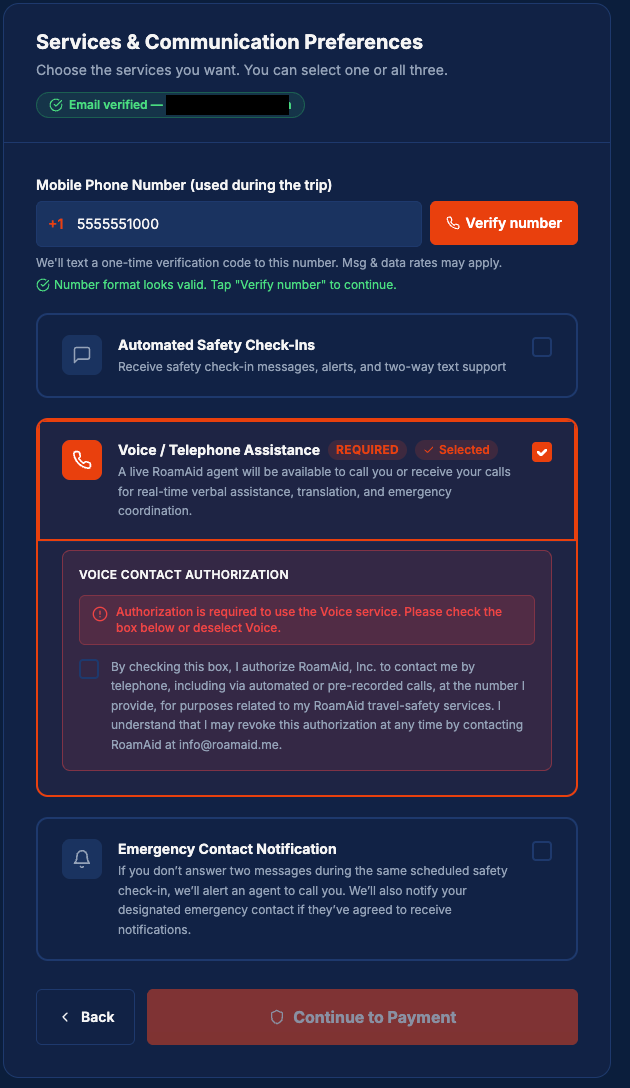
Screenshot of the RoamAid signup page 2 showing the Services and Communication Preferences form with the mobile number field, Voice Telephone Assistance selected as required, and the voice authorization checkbox unticked.
Step 2: Choose services. The traveler enters their U.S. mobile number, which receives a one-time verification code (Msg & data rates may apply). Voice / Telephone Assistance is the only required service; its authorization box covers phone calls only (not text messages) and is unticked by default, so the traveler must tick it themselves. Automated Safety Check-Ins (text messages) and Emergency Contact Notification are optional and unticked by default. In this example the traveler selects Voice only, so no recurring text messages will be sent. Signup can be completed without any text-message consent.
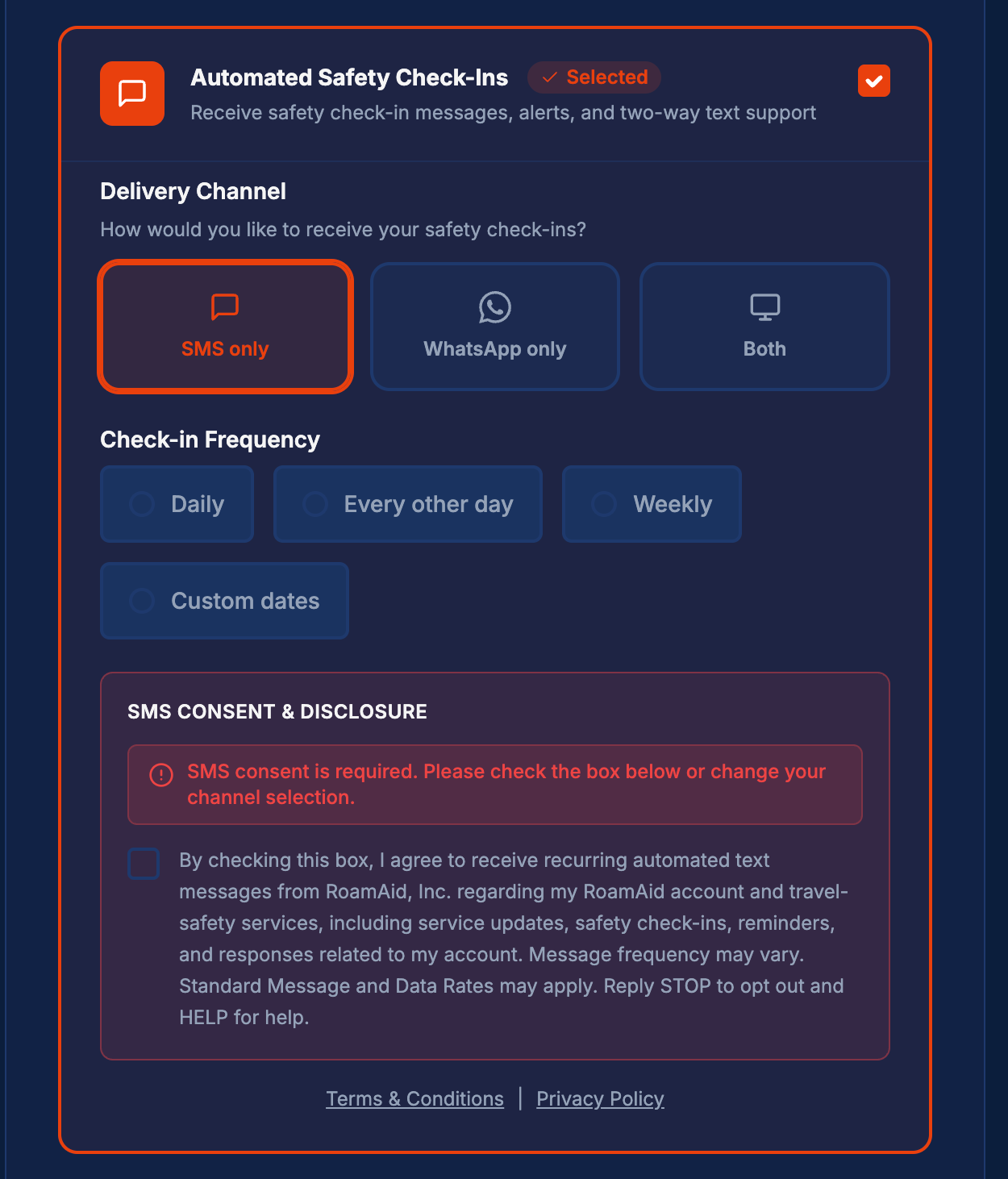
Screenshot of the RoamAid signup page 2 showing the Automated Safety Check-Ins service selected with SMS only delivery channel chosen and the SMS Consent and Disclosure box visible with the consent checkbox unticked.
Step 3: Optional SMS consent. The SMS Consent & Disclosure box appears only if the traveler chooses Automated Safety Check-Ins with SMS delivery. To receive SMS check-ins, the traveler must actively tick the consent box, which is unticked by default. If they do not want to agree, they can choose a different option or deselect check-ins; the on-screen note asks them to do one or the other. The disclosure states the message types, that frequency varies, that message and data rates may apply, and how to reply STOP to opt out or SOS for assistance, with links to the Terms & Conditions and Privacy Policy.
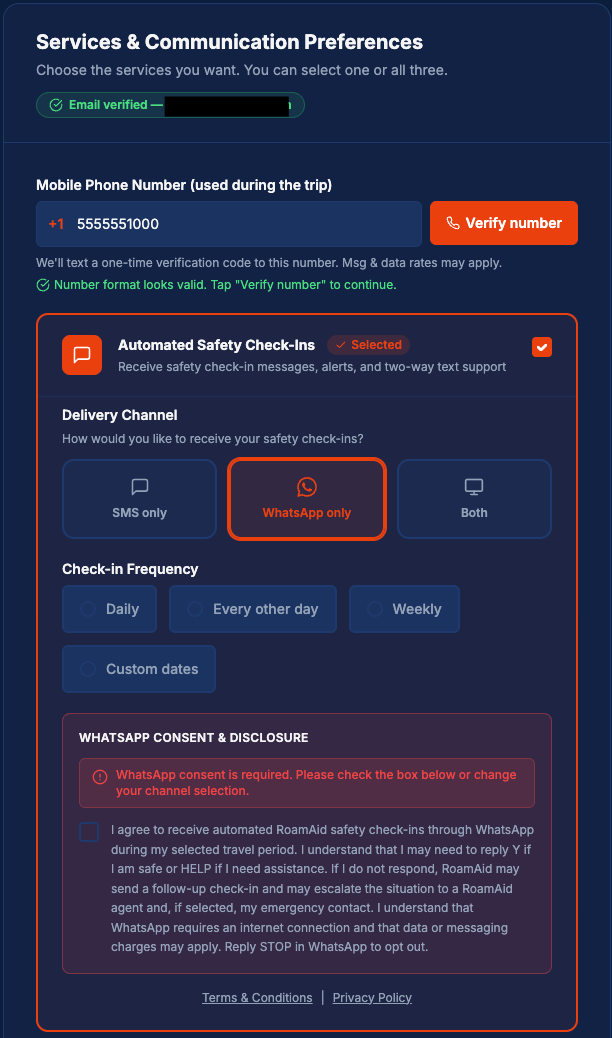
Screenshot of the RoamAid signup page 2 showing the Automated Safety Check-Ins service selected with WhatsApp only delivery channel chosen and the WhatsApp Consent and Disclosure box visible with the consent checkbox unticked.
Step 3b: Optional WhatsApp consent (separate from SMS). If the traveler chooses WhatsApp delivery instead of SMS, a separate WhatsApp Consent & Disclosure box appears, unticked by default. Choosing WhatsApp does not enroll the traveler in SMS text messages. SMS texts are sent only if the traveler selects SMS delivery and ticks the separate SMS consent box.
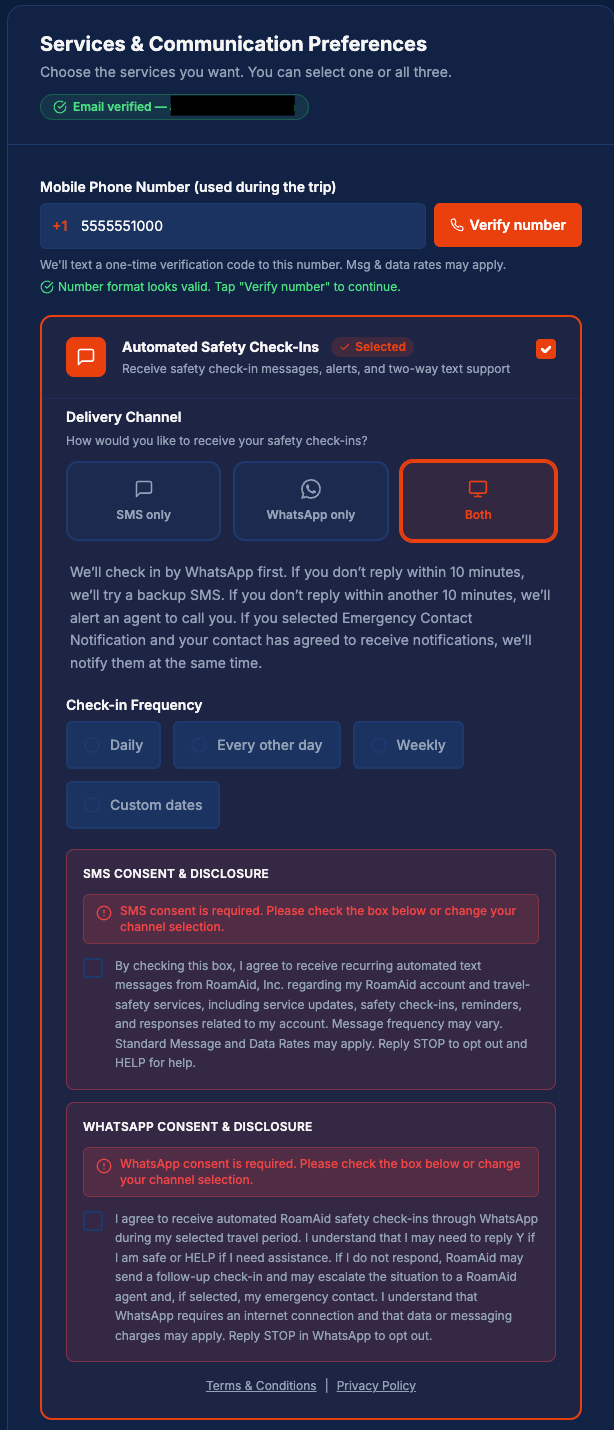
Screenshot of the RoamAid signup page 2 showing the Automated Safety Check-Ins service selected with Both delivery channels chosen, displaying both the SMS Consent and Disclosure and WhatsApp Consent and Disclosure boxes each with their consent checkboxes unticked.
Step 3c: Both channels: two separate consents. If the traveler chooses both WhatsApp and SMS, the page explains the check-in sequence (WhatsApp first, an SMS backup if there is no reply within 10 minutes, then an agent call). Two separate consent boxes appear, one for SMS and one for WhatsApp, each unticked by default and ticked independently. SMS texts are sent only if the SMS consent box is ticked.
Screenshot of the RoamAid signup page 2 showing the Emergency Contact Notification service selected with fields for the contact's name, relationship, and phone number, plus the Emergency Contact Authorization box with the authorization checkbox unticked.
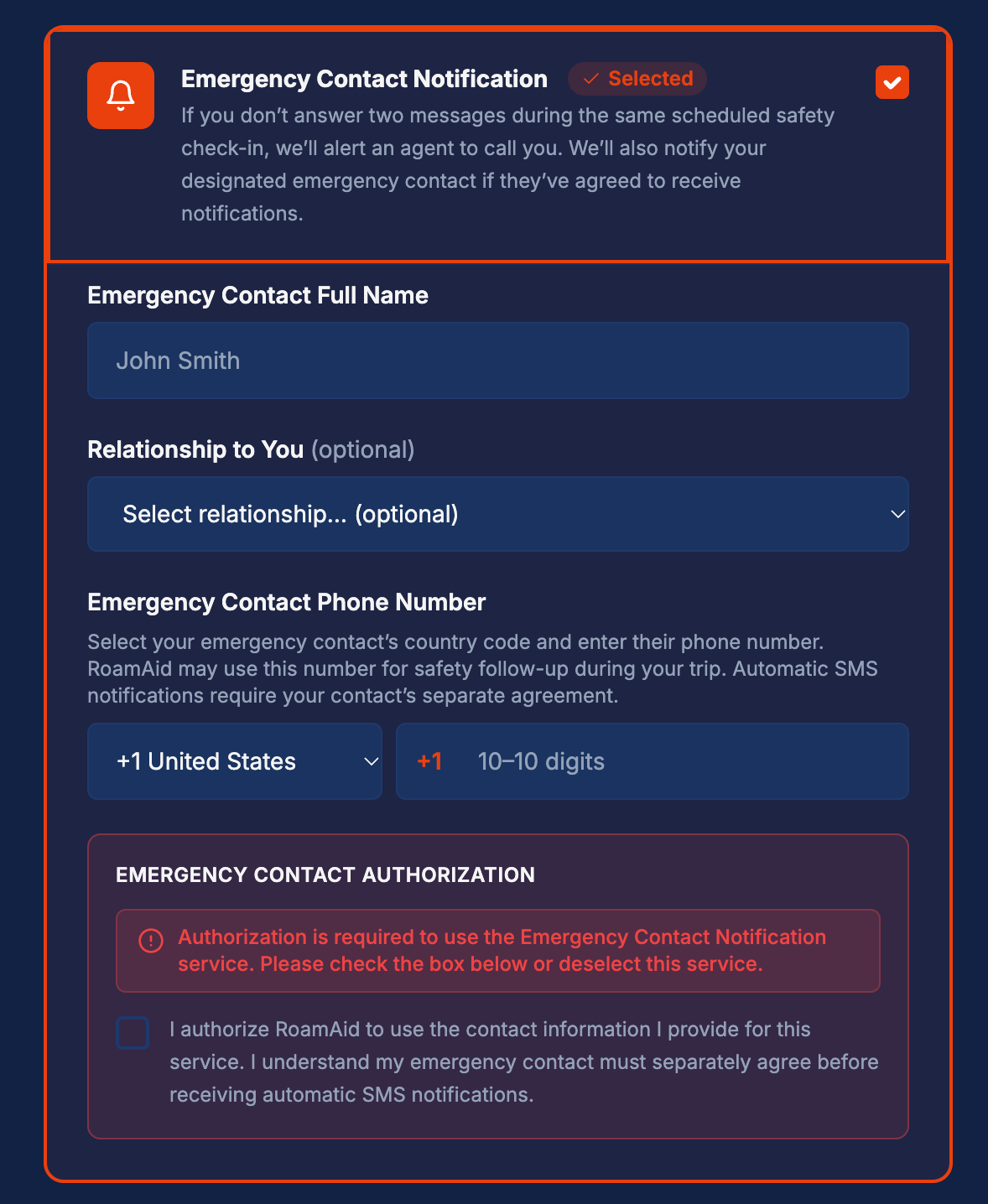
Step 4: Optional emergency contact (separate consent by the contact). If the traveler chooses Emergency Contact Notification, they enter the contact's name and phone number and tick an authorization box (unticked by default). This does not sign the contact up for texts. RoamAid sends the contact one invitation text asking them to reply YES to agree, or STOP to opt out. No further texts are sent to the contact unless they reply YES.

Screenshots above show test data only. No real customer information is displayed.

Message types

  • ·One-time verification code — sent to all customers during signup to verify your mobile number.
  • ·Trip confirmation — sent after activation to customers who selected SMS or WhatsApp check-ins.
  • ·Scheduled safety check-ins — up to 2 messages per scheduled check-in, sent only on the channel(s) you selected.
  • ·Replies to SOS — sent when you text SOS to acknowledge your request and confirm an agent has been alerted.
  • ·STOP/START confirmations — sent to confirm opt-out or reactivation.
  • ·Emergency-contact alerts — sent only to emergency contacts who replied YES to the consent invitation.

Frequency varies with your chosen check-in schedule. Msg & data rates may apply. Reply STOP to opt out of messages on that channel, or SOS for assistance. Consent to receive recurring messages is not a condition of purchase.

Contact us: +1 408-762-6243 or info@roamaid.me.

Emergency contacts

If you list an emergency contact, they receive a one-time invitation like this:

RoamAid: You have been listed as an emergency contact for a RoamAid traveler. To agree to receive assistance and missed-check-in notifications, reply YES. To decline, reply NO. For questions, call +1 408-ROAMAID or +1 408-762-6243. Reply STOP to opt out of these notifications.

No further messages are sent to the emergency contact unless they reply YES. They may withdraw consent at any time by replying STOP or NO.

Sample messages

The following are examples of messages customers may receive. Bracketed items are replaced with actual trip or traveler information.

W02 — Trip confirmation (SMS check-ins selected)

RoamAid: Welcome! Your trip is confirmed (Trip ID: [Trip ID]). Voice assistance and SMS safety check-ins are selected. Msg freq varies. Msg & data rates may apply. For assistance at any time, call or text "SOS" to +1 408-ROAMAID or +1 408-762-6243. Reply STOP to stop SMS check-ins for this trip.

C01 — Scheduled safety check-in

RoamAid Safety Check-In: Are you safe and okay? Reply Y if you're okay. For assistance at any time, call or text "SOS" to +1 408-ROAMAID or +1 408-762-6243. Reply STOP to stop check-ins on this channel for this trip.

C03 — Check-in confirmed safe

RoamAid: Thanks for checking in! Glad you're okay. We'll check in again at your next scheduled time. Reply STOP to stop check-ins on this channel for this trip.

E02 — Emergency contact consent invitation

RoamAid: You have been listed as an emergency contact for a RoamAid traveler. To agree to receive assistance and missed-check-in notifications, reply YES. To decline, reply NO. For questions, call +1 408-ROAMAID or +1 408-762-6243. Reply STOP to opt out of these notifications.

See also: Terms & Conditions · Privacy Policy · Contact Us

Questions? Email info@roamaid.me or call +1 408-762-6243.